ADR: What the store is actually doing
- Status
- accepted
- Date
- 2026-09-08
The document store's counterpart of the SQL card
on the Admin tab: every operation this container sent to Azure Cosmos DB, with
the container, the kind, the partition it was pinned to or the fact that it
fanned out, and the request charge beside the milliseconds. Parent: ADR: A
second store on Cosmos DB, and what it costs. The record this one sits beside,
ADR: What the database is actually doing, has an addendum pointing here.
In plain words
This page adds a live log of every operation the site sends to its document database (Azure Cosmos DB), shown on the Admin tab with what each one cost in request units beside its milliseconds. Like the SQL log beside it, it never shows a value such as an email address.
What that is worth: a developer can see which request caused each operation and whether it touched one partition or all of them, and the organization can show anyone its database costs on a public page with no login.
Context
The Admin tab's most valuable card for a data-access reviewer is the one that
shows the raw SQL and what each statement cost in time, with nowhere to put a
parameter value (ADR: What the database is actually doing). Cosmos DB has no
SQL log to intercept, and the thing worth showing about it is different: a
statement's cost on Cosmos DB is a number the service returns with every
response, in request units, and whether an operation touched one partition or
every partition is the difference the interview question is about.
Decision
A parallel port, not a wider one. ISqlLog and SqlStatement are left as
they are. A second port, IStoreLog, records a StoreOperation:
public sealed record StoreOperation(
DateTimeOffset At,
string Container,
string Kind,
string Text,
IReadOnlyList<SqlParameterShape> Parameters,
string Partition,
int PhysicalPartitions,
double RequestCharge,
long DurationMs,
string Outcome,
string? Request,
string? RequestId);
public static class StoreOperationKind
{
public const string PointRead = "point read";
public const string PointWrite = "point write";
public const string PointDelete = "point delete";
public const string Query = "query";
public const string Batch = "batch";
public const string Metadata = "metadata";
}
public interface IStoreLog
{
void Record(StoreOperation operation);
}
public sealed class NullStoreLog : IStoreLog
{
public static readonly NullStoreLog Instance = new();
private NullStoreLog() { }
public void Record(StoreOperation operation) { }
}
Live from api/TheYard.Application/Shared/Stores/StoreLog.cs, region store-log-port, read from this build at 8003063.
The two record different things. A SQL statement has its text and parameters
plus a duration. A store operation has a container, a kind, a partition, a request
charge and a duration, and only sometimes any text. One type for both would
carry nulls on every row on both sides, and the Admin card would be reading a
type to find out which half of it to believe.
The adapter writes the log, not an interceptor. There is no command to
intercept: the SDK is called directly (ADR: A second store on Cosmos DB, and
what it costs), and every call goes through one wrapper that times it and reads
the charge off the response. It records the operation whether the call succeeded
or failed:
internal async Task<TResponse> Timed<TResponse>(Container container, string kind, string text, IReadOnlyList<SqlParameterShape> parameters, string partitionLabel, int physical, Func<Task<TResponse>> operation, Func<TResponse, Cost> cost)
{
var clock = Stopwatch.StartNew();
try
{
var response = await operation();
var paid = cost(response);
Record(container, kind, text, parameters, partitionLabel, physical, paid.Charge, clock.Elapsed, paid.Status.ToString());
return response;
}
catch (CosmosException ex)
{
Record(container, kind, text, parameters, partitionLabel, physical, ex.RequestCharge, clock.Elapsed, "failed: " + (int)ex.StatusCode);
throw;
}
catch (Exception ex)
{
Record(container, kind, text, parameters, partitionLabel, physical, 0, clock.Elapsed, "failed: " + ex.GetType().Name);
throw;
}
}
Live from api/TheYard.Infrastructure.Cosmos/Shared/Stores/CosmosOperationLog.cs, region timed, read from this build at 8003063.
The no-values rule carries over exactly. A parameter is a
SqlParameterShape, which has no field for a value. And a partition is
described rather than named: "pinned to the buyer", "pinned to the account",
"cross-partition". The key of an account's partition is the account's id, and
the key of a claim document is an email address, so a log that printed the
partition key value would print the thing the SQL card was designed never to
print. A point read is logged as ReadItem with a parameter named id of type
String and the id's length, which is the same amount of information the SQL
card gives about @normalizedEmail.
Every fan-out says how far it fanned. A query with no partition key is
recorded as cross-partition with the container's physical partition count
beside it, read once at startup from the SDK's feed ranges. At this size that
count is one, and the card says one, because "cross-partition, 1 physical
partition" is the honest description of a fan-out to a single server and the
number will change when the data does (ADR: The partition key).
A query is one line with its pages added up. The SDK answers a query a page
at a time and charges per page. The log records one line per query with the
charge of every page summed and the page count in the outcome, so a two-page
load reads as one operation that cost what it cost, rather than two lines a
reader has to add.
Self-observation is filtered the same way. The health check's two point
reads every thirty seconds, and the reads this page itself causes, are dropped
before they reach the ring, for the reason the SQL ring drops its own: left in,
the card would show nothing but the act of reading it.
What it looks like
On the Cosmos container the SQL card is replaced by this one. On the relational
container this endpoint answers an empty list and the SQL card stays. One
image and one page, and the page shows whichever store it is on:
const storeColumns = (window_: CardWindow): Column<StoreOperation>[] => [
{ name: 'At', mono: true, short: true, cell: (operation) => stampFor(window_, operation.at) },
{
name: 'Took',
mono: true,
num: true,
cell: (operation) => `${formatNumber(operation.duration_ms)} ms`,
},
{ name: 'Charge', mono: true, num: true, cell: (operation) => `${operation.request_charge} RU` },
{ name: 'Caused by', mono: true, cell: (operation) => operation.request ?? 'startup' },
{ name: 'Container', mono: true, cell: (operation) => operation.container },
{ name: 'Kind', short: true, cell: (operation) => operation.kind },
{
name: 'Partition',
cell: (operation) =>
operation.partition +
(operation.partition.startsWith('cross')
? ` (${operation.physical_partitions} physical)`
: ''),
},
{
name: 'Operation',
cell: (operation) => (
<>
<pre className={styles.sql}>{operation.text}</pre>
<span className={styles.muted}>{operation.outcome}</span>
</>
),
},
{ name: 'Parameters', mono: true, cell: (operation) => describeParameters(operation.parameters) },
];
function StoreTable({
log,
rows,
window: window_,
picker,
}: {
log: StoreLog;
rows: Fetched<StoreOperation[]>;
window: CardWindow;
picker: ReactNode;
}) {
return (
<article className={`${styles.wide} op-glass`} data-testid="store-card">
<h2 className={styles.cardTitle}>What the document store ran</h2>
<About>
Every operation this container sent to {log.store}, newest first: the container, whether it
was a point read, a point write, a query or a batch, whether it was pinned to one partition
or fanned out across every physical partition, and what it cost in request units beside how
long it took. Parameters are listed by name, type and size and never by value, and a
partition is described rather than named, because this page is public and the key of an
account’s partition is the account. Operations caused by this page and by the health
check are left out. The buffer holds the last 200 in this container’s memory and
empties on every deploy.
</About>
{picker}
{rows === null ? (
<CardState state="loading" />
) : rows === 'failed' ? (
<p className={styles.muted} data-testid="card-failed">
Could not read the store log on the last try; the next try is in 30 seconds.
</p>
) : rows.length === 0 ? (
window_ !== 'now' ? null : (
<p className={styles.muted}>Nothing recorded yet.</p>
)
) : (
<DataTable
label="Operations this application sent to the document store"
rows={rows.slice(0, window_ === 'now' ? 60 : 200)}
rowKey={(_operation, index) => index}
columns={storeColumns(window_)}
/>
)}
</article>
);
}
Live from src/components/admin/StoreCard/StoreCard.tsx, region store-card, read from this build at 8003063.
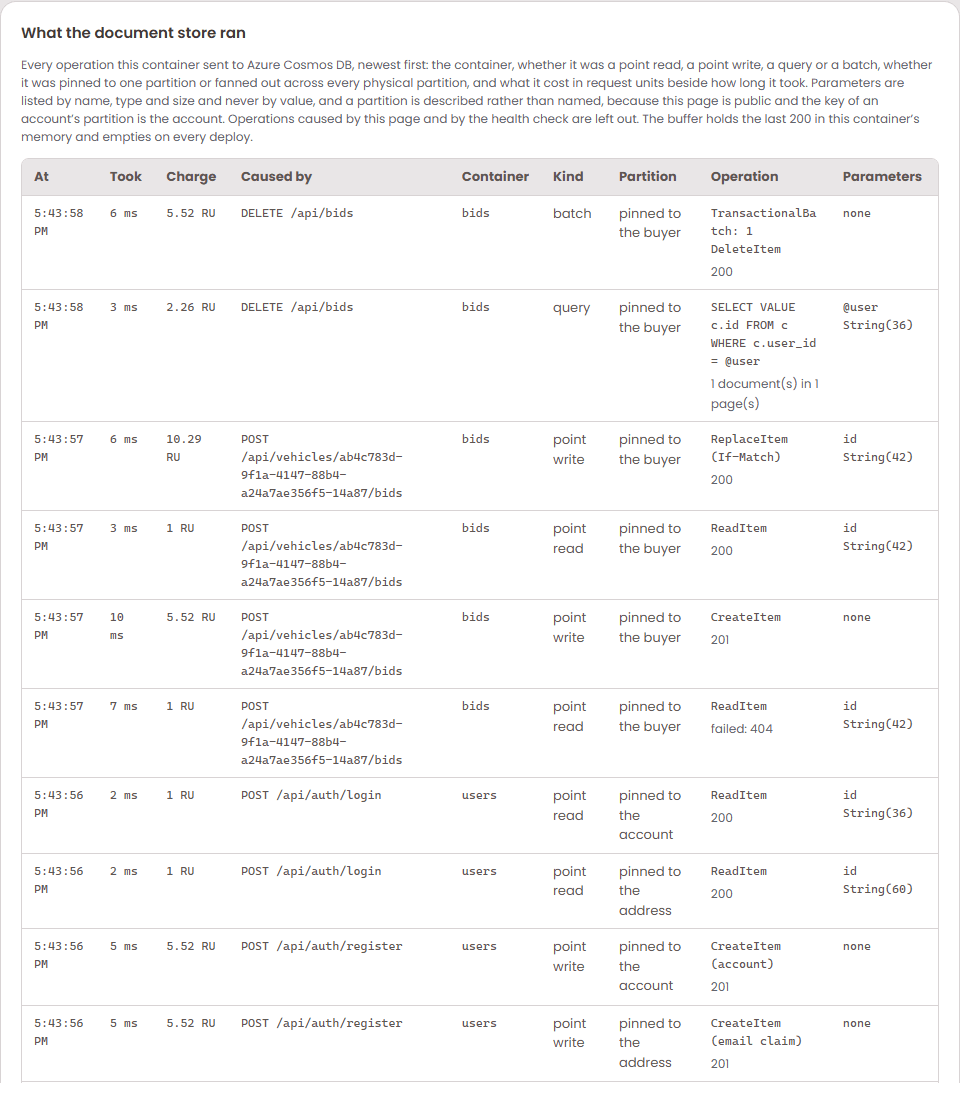
The cold start is the first thing in the log: four ReadContainer metadata
reads, then the count queries that decide whether to seed, then the two
cross-partition SELECT * FROM c loads of the catalogue and the bids, each with
its charge. After that an idle container records nothing, and a visitor's bid
records a point read and a point write pinned to the buyer, about six request
units between them.
Here is that card on 1.0.0.92 with one visitor's whole session in it, newest
first: a reset (a query pinned to the buyer's partition and a transactional
batch of one delete, 7.78 RU together), a raise (a point read and a
ReplaceItem with If-Match, 11.29 RU), a first bid (a point read that finds
nothing, which costs the same 1 RU as one that does, and a CreateItem), a
sign-in (two point reads, 2 RU), and a registration (two creates and the two
reads that looked for a claim first, 13.04 RU):
The same three minutes on the relational container, from its own card, where
the same reset and raise are a DELETE with one parameter and an UPDATE
guarded by RowVersion, at 44 and 41 ms against the document store's 6 and 6:
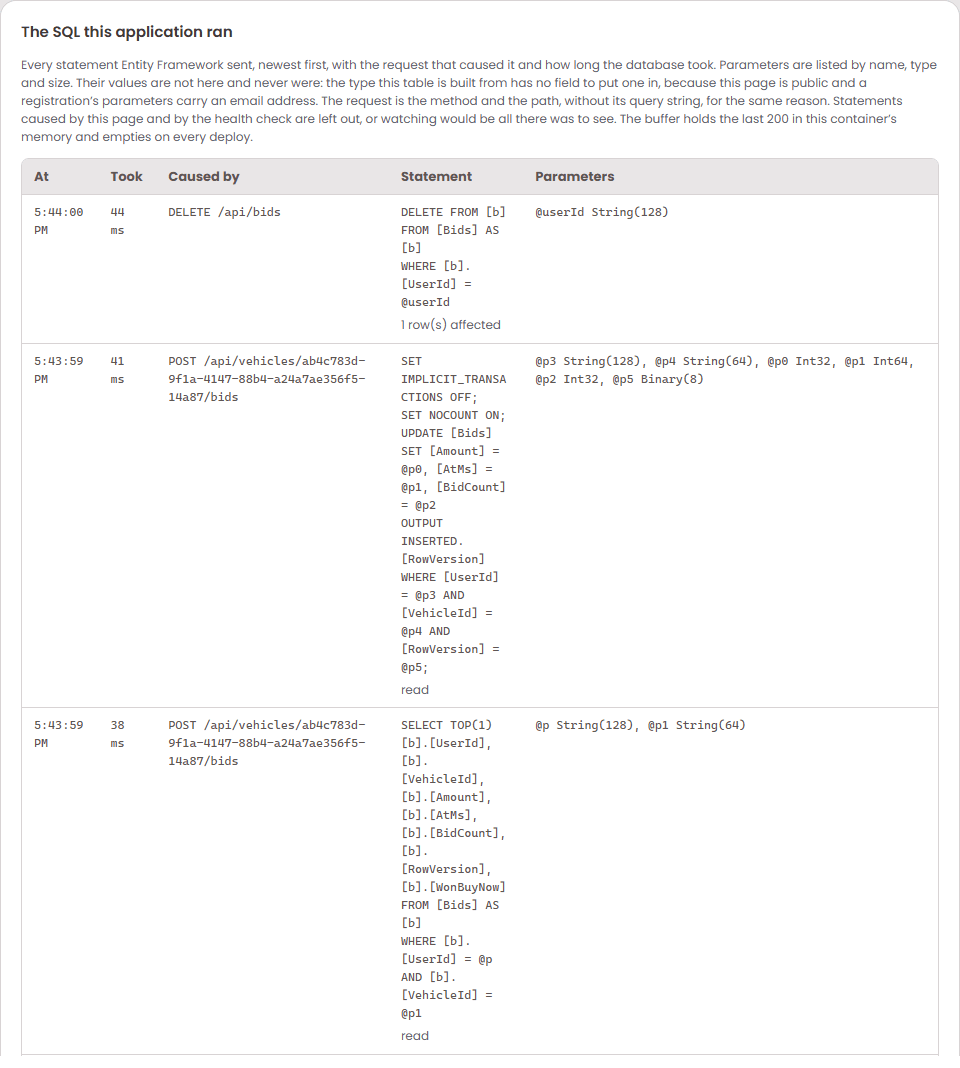
The two cards are the same page reading the same ring, and the columns differ
because the stores do: the relational card has nothing to say about a
partition or a charge, and the document card has no statement to show, only
the operation and what it cost.
What the tests hold
The same canary as the SQL card, on both stores: register an address, read what
the store ran, assert the users container is in it and the address is not, in
the operations and in the log lines. AdminObservabilityTests asks the
container which store it is on and reads the matching card, so one test holds
the rule against both:
private async Task<(bool Cosmos, string Body)> WhatTheStoreRan()
{
string store = await _client.GetStringAsync("/api/admin/store");
using var json = JsonDocument.Parse(store);
bool cosmos = json.RootElement.GetProperty("store").GetString() == "Azure Cosmos DB";
return cosmos
? (true, json.RootElement.GetProperty("operations").GetRawText())
: (false, await _client.GetStringAsync("/api/admin/sql"));
}
Live from api/TheYard.Tests/AdminObservabilityTests.cs, region what-the-store-ran, read from this build at 8003063.
And against the real account, the store tests assert that every operation
carries a charge, that the only cross-partition operations are the loads, and
that no operation's text or partition carries the address (ADR: Accounts on a
document store).
Consequences
- A reviewer can watch the operations this container sends to Cosmos DB, see
which request caused each one, and see what each cost in request units, on a
public page, with no login and no portal.
- The comparison card has a number to put beside every millisecond on the
document side, which is what makes it a comparison rather than two stopwatches.
- One more fixed-size ring in memory, two hundred operations, emptied on every
roll.
- The relational side did not change.
ISqlLog, the interceptor and the SQL
card are as they were, and a container on SQL Server never sees the new type.
Addendum, 2026-09-09: one console line per operation, like every statement
Looking at both Admin tabs after the two-sites lane, Steve noticed the Cosmos DB
side had no log like the SQL side's, and asked for one, even a log of the API
requests. He was
reading the last card, the log as the console got it. On the relational side
that card shows every statement, because Entity Framework logs each command
at Information and the ring captures that one framework category. The
document store had its own card above with every operation, its charge and
its partition, and nothing in the console log at all, so the third place the
page shows a store's traffic showed one store.
From 1.0.0.103 the store writes one line per operation to the application's
logger, in the shape Entity Framework gives a statement: what ran, on which
container, what it cost in request units, how long it took, the partition
described, the outcome and the query with its parameters by name. Never a
value, for the reason this record already gives. The logger is attached by
the host after the container is built, the way the relational side attaches
Entity Framework's, so a startup operation on a developer's machine is
silent and everything after the application exists is on the console, in
Application Insights, and on the card. A test asks the container for a
request served by the document store and reads the line back under the
store's own category, and checks the address it looked up is nowhere on the
page.
internal void Record(Container container, string kind, string text, IReadOnlyList<SqlParameterShape> parameters, string partitionLabel, int physical, double charge, TimeSpan elapsed, string outcome)
{
try
{
string name = NameOf(container);
double rounded = Math.Round(charge, 2);
long ms = (long)elapsed.TotalMilliseconds;
log.Record(new StoreOperation(
DateTimeOffset.UtcNow,
name,
kind,
text,
parameters,
partitionLabel,
physical,
rounded,
ms,
outcome,
CurrentRequest.Describe(),
CurrentRequest.Identify()));
Logger.LogInformation(
"Executed Cosmos DB {Kind} on {Container} ({Charge} RU, {Ms} ms, {Partition}) {Outcome}: {Text}",
kind, name, rounded, ms, partitionLabel, outcome, text);
}
catch
{
}
}
Live from api/TheYard.Infrastructure.Cosmos/Shared/Stores/CosmosOperationLog.cs, region record, read from this build at 8003063.
Where it sits
Three rings share this one: Application owns the IStoreLog port and the StoreOperation record in StoreLog.cs, Infrastructure.Cosmos fills it from the one wrapper in CosmosOperationLog.cs that times every SDK call and reads its charge, and the Api host keeps the ring the Admin tab's StoreCard reads from. Interface segregation, small interfaces shaped to what a caller needs, is the plain reason for a parallel port: ISqlLog stayed as it was, so a container on SQL Server never meets a type full of request charges and partitions it has no use for. Dependency inversion follows too, since the adapter writes to an interface Application defined and the host decides where the lines end up. The price is one more fixed ring of two hundred operations in memory and a second card to keep in step with the SQL one, and a system with many store types would probably push this into OpenTelemetry spans instead of a hand-built ring per store.